


Instant
Quick & easy deposits

Up to 60 mins
Avg time for processing withdrawals

24/7
Customer Support

58,687 CAD
Max. win in 1 spin
Casino






Live casino





Promotions

Tournament
Golden Entry
Prize Pool
600 CAD real money + 60 FS
Promo
Install the App
What’s offered
20 no-deposit Free Spins


Your Charmius Casino Real Money Login — Quick-Access Guide
Two fields. One click. Done. Our sign-in form is built for speed, and once you’re inside your Charmius Casino real money login account, you have immediate access to 3,000+ games, active bonus cards, and a full VIP progression dashboard. We also run 24/7 live chat support and a browser-based PWA app — no App Store required. New to us, eligible for up to 2,000 CAD + 100 FS across your first two deposits.

How the Login Form Works
Our login form is deliberately minimal. Two fields are all it takes — your registered email address and your password, which includes a show/hide toggle so you can confirm exactly what you’ve typed before submitting. Hit the Log In button and access is immediate.
The form also carries a direct link: “Don’t have an account? Sign up”, positioned cleanly beneath the main action button. If you’ve forgotten your credentials, the Charmius Casino login guide overview covers the full process from entry to account access in detail. Password recovery is handled separately — more on that below.
Here’s a quick breakdown of everything on the login screen:
| Element | Detail |
| Email field | Your registered email address |
| Password field | Masked by default; show/hide toggle available |
| Log In button | Submits credentials and loads the dashboard |
| Forgot your password? | Triggers a password reset link to your inbox |
| Sign up link | Redirects new users to the registration form |
Every session is protected by TLS 1.2 and AES 256-bit encryption, so your credentials are never transmitted in plain text. That’s the baseline — not a feature, just how we operate.
What New Players See on the Sign-In Screen
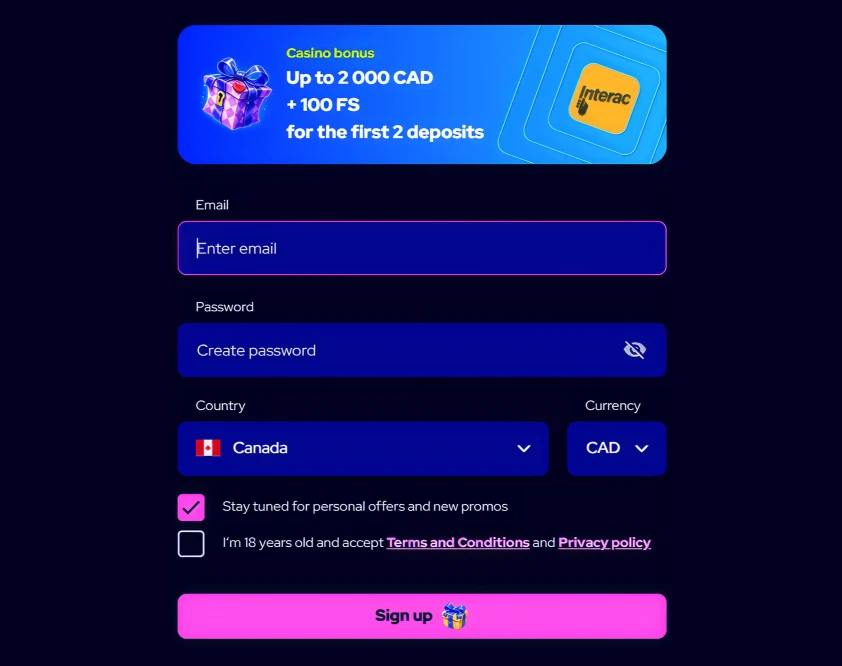
First-time visitors land on the login screen with a sign-up prompt clearly visible. A promotional banner at the top of the registration form states: “Casino bonus — Up to 2,000 CAD + 100 FS for the first 2 deposits”, with Interac branding displayed. That context matters — it tells you the bonus is real and already waiting before you’ve typed a single character.
The sign-up form itself collects the following information:
- Email address — used as your permanent login identifier
- Password — created at registration, with a show/hide toggle for accuracy
- Country — dropdown with Canada pre-selected as the default
- Currency — dropdown defaulting to CAD
Two checkboxes appear at the bottom. The first, “Stay tuned for personal offers and new promos”, is checked by default. The second — “I’m 18 years old and accept Terms and Conditions and Privacy policy” — is required and must be manually confirmed before the Sign Up button activates. We enforce the minimum age of 18 strictly; suspected underage activity triggers an immediate verification check.
Once submitted, a confirmation email is sent. Verifying your email unlocks 10 free spins on Zeus Goes Wild (0.20 CAD per spin, max win 75 CAD, x40 wagering, valid 9 days).
Inside Your Account After Signing In
After a successful login, our member dashboard opens with seven navigation tabs: Profile, My Level, Bonuses, Promo Code, Verification, Limits, and Bets History. Each tab serves a distinct function. Two of the most actively used are Bonuses and My Level.
Tracking Offers in the Bonuses Tab
The Bonuses tab is your central hub for all active, pending, and available offers. Every bonus is displayed as a card — structured, not hidden. Each card contains the following information:
- Bonus type tag — Casino or Sport, so you know immediately where the funds apply
- Expiry countdown — a live timer (e.g., “Expires: 09d 19:19:58”) so nothing expires without warning
- Bonus title and description — for example, “No Deposit 10 FS for email verification” or “First deposit bonus”
- Key terms — bonus percentage and minimum deposit displayed upfront
- Action button — either “Verify email”, “Deposit”, or “Details” depending on the bonus status
Filtering by Casino or Sport narrows the view instantly. If you hold a promo code, navigate to Profile → Promo Code, enter it in the input field, and click Activate — the resulting bonus appears in this tab under “Available.” One important rule: only one bonus is active per deposit, and the queue follows the order of activation. To cancel a bonus mid-wagering, go to Profile → Bonuses → View Details → Cancel Bonus.
Max bet during any active wagering period is 7.50 CAD — exceeding that voids the bonus automatically.
Your Progression in the My Level Tab
Our VIP structure runs on two parallel systems — Lifetime XP and Seasonal SP — and the My Level tab shows exactly where you stand in both. Your current level is displayed with its name (for example, “Unformed Key” at Level 1), a live XP progress bar, and the exact XP required to reach the next tier.
XP accumulates as follows: 1 XP per 15 CAD wagered on slots, 1 XP per 29 CAD on live games, and 1 XP per 8 CAD on sports. Deposits also contribute — up to 23 XP per deposit. XP never resets. At 15,000 lifetime XP, VIP Iron unlocks and Seasonal progression (Bronze through Diamond) begins running in parallel. A “Check My Progress” button sits directly on the tab, with the prompt “Speed up for VIP rewards” as a visible target.
Registration — the First Step to Every Login
Every Charmius Casino real money login starts with a registered account. Registration is a single-screen process: email, password, country (default Canada), and currency (default CAD). Submit, confirm your email, and access is live. If you enter a password and later forget it, our recovery flow is straightforward — the Charmius account password recovery details walk through the exact steps, from requesting the reset link to setting a new credential.
Your Charmius real money account is locked to one currency at registration. Changing currency requires a new account — the existing one is closed. One account per person is enforced strictly: one per household and IP address. Multiple accounts result in blocking and forfeiture of funds. That’s an AML requirement, not discretion.
After registration, a complete Profile is required before withdrawals. Navigate to Profile → Personal Information and fill in: first name, last name, date of birth, province/territory, city, street address, and postal code. All fields are mandatory. Completing this speeds up future payment processing considerably.
Account Security and KYC Requirements
Access to your Charmius Casino real money login account means access to real funds — so KYC is mandatory before any first withdrawal. The process takes 2–24 hours as a one-time verification. Status is visible at Profile → Verification.
For Canadian members looking into specific login access problems, the Charmius Casino login issues information covers documented cases and resolution paths. The Charmius Casino sign in Canada process itself requires no special regional configuration — country is pre-selected at sign-up.
Documents required for KYC:
- Government-issued ID — passport, national ID card, or valid driver’s licence
- Proof of address — utility bill or bank statement dated within the last 3 months
- Proof of payment method — bank card copy showing cardholder name, first 6 and last 4 digits; CVV and middle digits must be covered
Accepted formats: JPEG, PNG, or PDF up to 10 MB per file. Upload via Profile → Verification. Payment method verification only becomes available after identity documents are submitted and approved. Failing KYC can result in withdrawal delays, functionality restrictions, or account suspension. We request it to protect your funds — not to create friction.
Logging In via the PWA App on Any Device
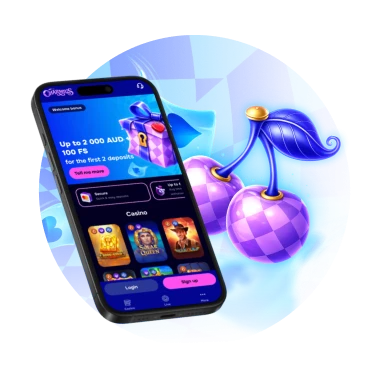
Our PWA installs directly from the browser in under a minute — no App Store listing, no download queue. The Charmius system requirements for login detail minimum browser and OS specifications across all platforms. Once installed, the app delivers a full Charmius play for real money login session identical to the desktop version.
Device-specific installation steps:
- Android (Chrome): Tap the three-dot menu → select “Install Charmius Casino app” → tap Install
- iOS (Safari): Tap Share → select “Add to Home Screen” — the PWA icon appears on your home screen
- Windows (Chrome): Click the install icon in the address bar → confirm Install
- macOS (Safari): Click the install icon → select “Add to Dock”; Chrome address bar install also works on macOS
Installing the PWA on a new device also triggers a one-time bonus: 20 free spins at 0.10 CAD per spin, credited automatically and activated via Profile → Bonuses. This can only be claimed once. After install, login uses the same email and password as the desktop version — there are no separate app credentials.
Responsible Gaming Controls Inside Your Account
After login, all responsible gaming tools are self-managed from Profile → Limits. No support request is needed — you control every setting directly. The Charmius Casino member portal gives Canadian players full autonomy over their spending and session behaviour. For additional security on your account, the Charmius Casino two-factor authentication guide explains how to add an extra verification layer to your sign-in process.
All limit types available post-login:
| Limit Type | Options / Parameters |
| Deposit limit | Daily, weekly, or monthly cap in CAD |
| Loss limit | Calculated as total bets minus total wins |
| Session time limit | Custom duration with in-session reminders |
| Cooling-off period | 24 hours, 3 days, 7 days, 14 days, or 1 month |
| Self-exclusion | 1 month to 1 year; account fully blocked; irreversible during the period |
Decreasing a limit takes effect immediately. Increasing or removing a limit requires a 24-hour confirmation delay — built in to prevent impulsive changes. Self-exclusion blocks all login, deposit, and betting access for the full selected period. It cannot be undone mid-term. External support is also available: ConnexOntario at 1-866-531-2600, Gamblers Anonymous, and Gambling Therapy are all resources we actively reference.
Frequently Asked Questions
How do I access my Charmius Casino real money login if I forget my password?
Click “Forgot your password?” on the login screen, enter your registered email, and we’ll send a reset link. Follow the link, set a new password, and log in normally. The process takes under two minutes.
What documents do I need before my first withdrawal?
You need a valid government-issued ID, a proof of address dated within three months, and verification of your payment method. Upload these at Profile → Verification. Approval takes 2–24 hours as a one-time process.
Can I stay logged in across multiple devices?
Our PWA installs on Android, iOS, Windows, and macOS, and each uses your same account credentials. You can access your account from multiple devices, but only one account per person is permitted at all times.
Why is my bonus not showing after I deposited?
Bonuses must be selected before confirming a deposit in Cashbox. If you skipped that step, the bonus will not be retroactively applied. Check Profile → Bonuses to see available offers and their activation status.
What happens to my bonus if I request a withdrawal?
Requesting a withdrawal while a bonus is active automatically cancels that bonus. Bonus funds and any associated wagering progress are forfeited. Only real balance is processed in the withdrawal, subject to a minimum of 50 CAD per transaction.
Charmius is always with you!
Install the application and participate in the Play with the App promo.
We use innovative installation technology directly from the browser. For any operating system.